Как вывести в случае находки?
Пошаговое руководство: Electrum 4.0.9 + Slipstream Mara
Внимание! Руководство создано на основании опыта знающих людей.
Ссылки на оригинальные инструкции — ниже в аккордеоне.
Весь процесс — на ваш риск. Всегда проверяйте адрес получателя и комиссию.
Оригинальные инструкции
Открыть на bitcointalk
The death of the monitoring bots for the low bit challenge/puzzles such as the 66, 67, 68 bits.
The sure fire way to get all of your hard earned 6.6 BTC into one of your safe wallets...or is it a sure fire way?

Ok, so here is the current, thoughtout way to beat the bots when dealing with the puzzle/challenge low bit wallets.

I tried this on my first test, but it didn't quite work. I thought it was probably because I fat fingered something, although I knew I didn't.

Turned out to be a lack of monitoring, possibly.

So I know of two tests, that have worked, so I am laying this out here so maybe someone can shoot holes in it.

What I would do if I found the 66 bit key.

First:
Take the 66 bit found key and import it into whatever wallet. In my tests, I used electrum.
You can use whatever wallet (as long as it allows you to export a signed raw transaction hex.)

Second:
Go to https://slipstream.mara.com/ and see what their current minimum fee rate is.

Third:
Now, create a payment to a safe wallet of yours (from the found, imported, 66 bit wallet).
Go through all of the pay options in your particular wallet, pay to, amount, fee, and sign.
(Make sure your transaction fee covers the minimum over at slipstream.) BUT DO NOT BROADCAST.

Fourth:
Export the signed transaction, save it somewhere safe.

Fifth:
Open that exported transaction document — you should see a long hex string starting with 01 or 02.

Sixth:
Copy that raw transaction.

Seventh:
Go back to https://slipstream.mara.com/, paste the raw transaction and press "Activate Slipstream".
You should receive a confirmation like:
"In Marathon's mempool, waiting to be mined. You can view the status here."

Eighth:
Press "view status here" — opens a new window showing tx status in their mempool and the Transaction ID.

Ninth:
Copy the transaction ID and save it.

Now you have bypassed the regular mempool.

On my first test, my tx just sat there for days. I reached out to slipstream via email, but since my tx was gone from their mempool, I didn't get an answer.
So I ran another test, this time including my tx id in the email — and the transaction was included in their next mined block.

The other individual who ran the test also had to email slipstream, then their tx was included into Mara's next mined block.

Either way, two tests completed with the process above with expected results.

The sent-from address's tx is never sent to the mempool, exposing its public key.
Only after it has been mined into a block, is it exposed.
Открыть на bitcointalk
Quote from: zion3301 on April 08, 2025, 05:34:11 AM
Can anyone explain how to use MARA in case of finding a puzzle key?

ELECTRUM
Import Wif Key as...
Enter destinatary address
Enter amount
Click Pay
Click Preview
Enter fee manually
Click Sign
Share
Export to file
Open exported file
Copy RAW TX
Enter it to Mara site at
https://slipstream.mara.com/

--------------------------------------------------------------------------------------------
HOW TO SIGN A TRANSACTION

How to claim your low range BTC reward?

1- Download Electrum and import the key of the 67. (Maybe old version for RBF off)

2- Sign a transaction (dont send/broadcast)

3- Copy tx id (starts with 02 or 01 and too long)

4- Go to https://slipstream.mara.com and paste tx id. Then press "activate"
(make sure fee is good)

Done. Your tx doesn't show in mempool and will be included next mined block by mara.
Полезные ссылки
- Electrum 4.0.9 — версия, на которой проверено
- hex_to_wif.py — скрипт конвертации
- hex_to_wif.bat — запускает скрипт
- https://slipstream.mara.com/ — приватный мемпул Mara
Пример вывода hex_to_wif.py
Введите HEX или WIF приватный ключ: 31c24239a829a89d7e12a0a5b1456ce60168c2c7dd29b63ea6a2aa8ef6466505

Private Key HEX: 31c24239a829a89d7e12a0a5b1456ce60168c2c7dd29b63ea6a2aa8ef6466505
Private Key WIF: 5JCCbydx5Hppf8btaK5ahzDtcCrMiasGynoaSMMehPKebUtZ5kf
Private Key WIF compressed: KxtSDNz65wG5MJYze2oDmuZtnPJrSYUuXfAaatr9PFXJvuQPeGUV

Public Key: 04c013ef7c5a5bb9b5aa90c8ee76d9c06d063e3127423f2f0c135ab003ce79a0c0e6e3a5a7aa9e090aa46bcda87805adabe5d3a4883cf0691ea8a5cd0d9c451617
Public Key compressed: 03c013ef7c5a5bb9b5aa90c8ee76d9c06d063e3127423f2f0c135ab003ce79a0c0

Public Address 1: 1DcYbgcJk2YyZXUsTxqDZFJTMmbHogSZUK
Public Address 1 compressed: 15mQK11ANTr5UdGevg7Ru1EJ1fxDdwuNQe
Public Address 3: 3DCmmqQ9zuJH3Yya3FGVxjqf7Jn81qiDps
Public Address bc1 P2WPKH: bc1qx3ry8yjzqew5uze5k23llme8yd9gfhpmzhpwaj
Public Address bc1 P2WSH: bc1qay8npas5vymyueepzfpfmcm994vhcu8zertqmjrevvqv997nf0mszmx70e

-------------------------------- MANUAL IMPORT -----------------------------------------

-- WIF --
p2pkh:5JCCbydx5Hppf8btaK5ahzDtcCrMiasGynoaSMMehPKebUtZ5kf -> 1DcYbgcJk2YyZXUsTxqDZFJTMmbHogSZUK

-- WIF compressed --
p2pkh:KxtSDNz65wG5MJYze2oDmuZtnPJrSYUuXfAaatr9PFXJvuQPeGUV -> 15mQK11ANTr5UdGevg7Ru1EJ1fxDdwuNQe
p2wpkh-p2sh:KxtSDNz65wG5MJYze2oDmuZtnPJrSYUuXfAaatr9PFXJvuQPeGUV -> 3DCmmqQ9zuJH3Yya3FGVxjqf7Jn81qiDps
p2wpkh:KxtSDNz65wG5MJYze2oDmuZtnPJrSYUuXfAaatr9PFXJvuQPeGUV -> bc1qx3ry8yjzqew5uze5k23llme8yd9gfhpmzhpwaj
Пошаговая инструкция
Electrum 4.0.9
Весь процесс — в Electrum 4.0.9. В других версиях не проверялось.
1
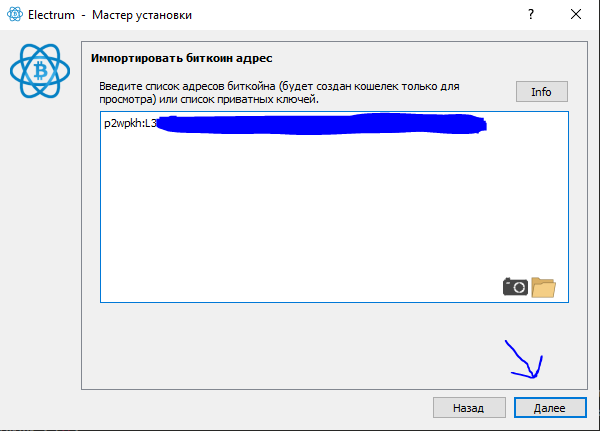
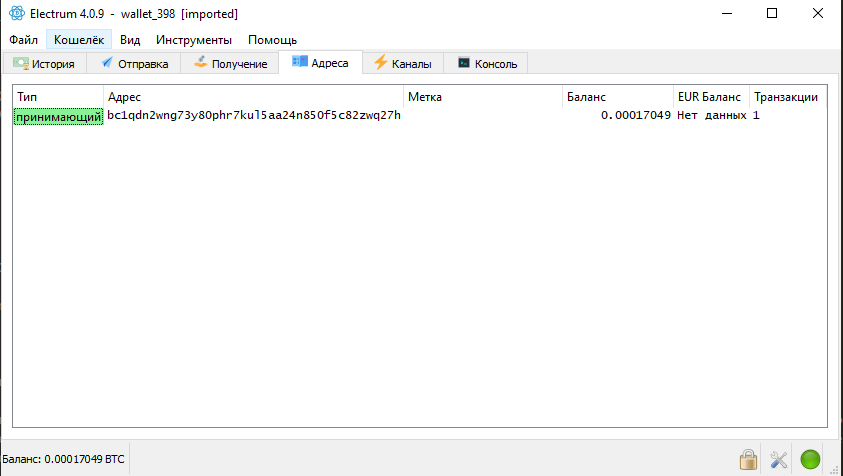
Импорт ключа
Импортируем закрытый ключ в Electrum 4.0.9.
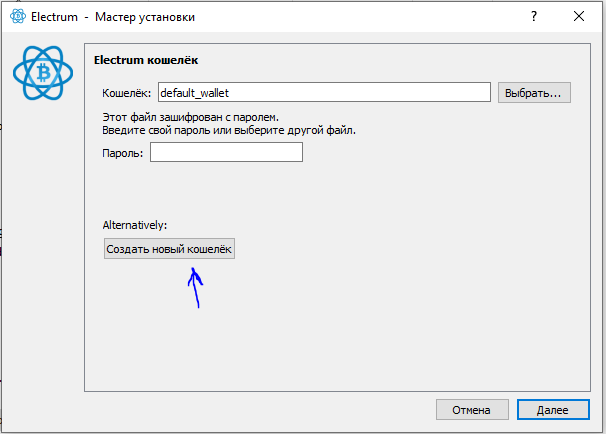
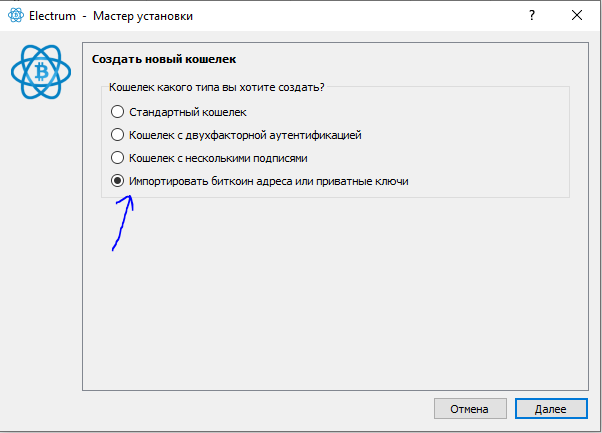
Я импортирую p2wpkh, так как у меня bc1q адрес с балансом.
Пазлы — это p2pkh.
2
Настройка Electrum
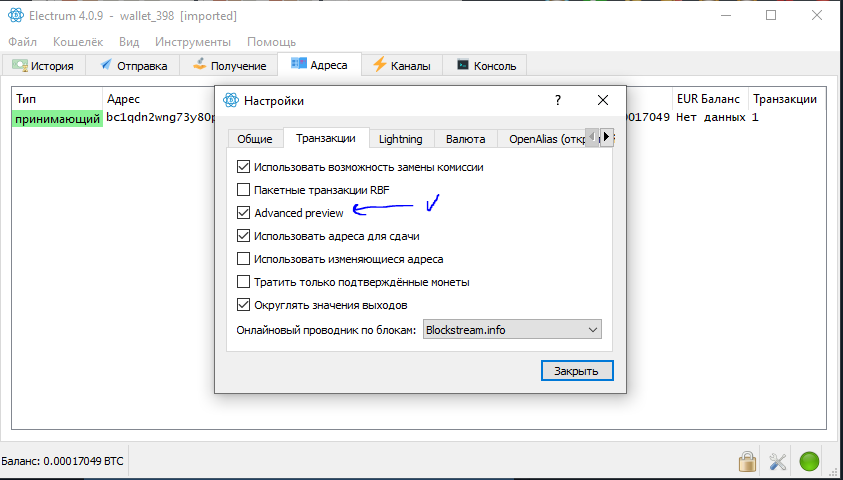
Переходим в настройки: Инструменты → Настройки.
Включаем «Advanced Preview», если ещё не включено.
3
Подписание транзакции
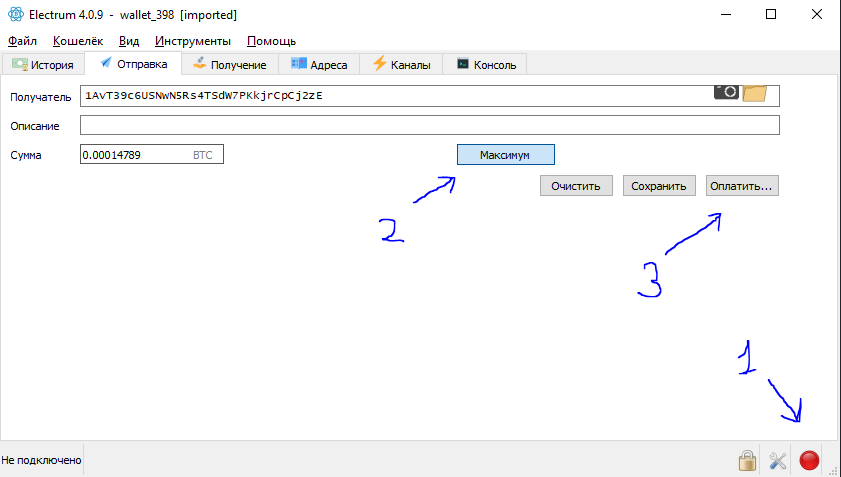
Рекомендую выключить интернет на этом этапе — чтобы случайно не отправить транзакцию в сеть.
Переходим во вкладку «Отправить». Нажимаем «Максимум». Нажимаем «Оплатить».
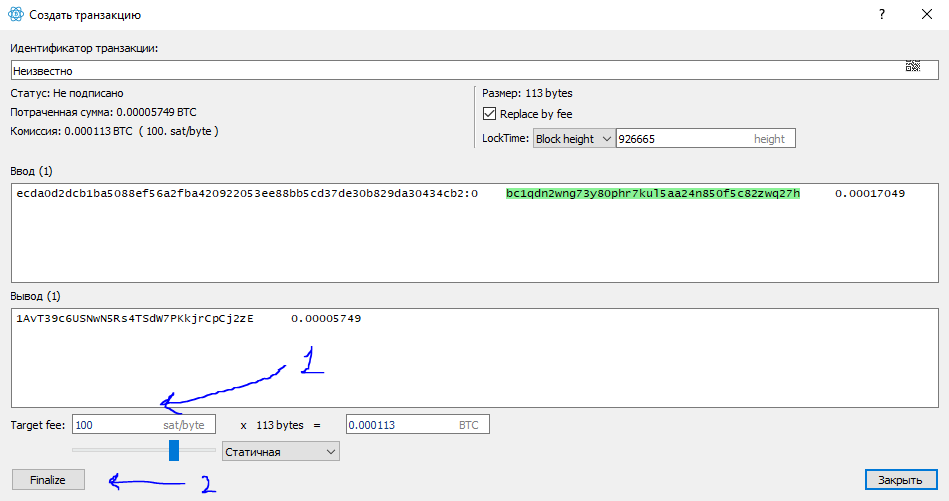
Указываем достаточную комиссию — лучше не жалеть, чтобы Mara приняла транзакцию в следующем блоке. Нажимаем «Finalize».
Нажимаем «Подписать».
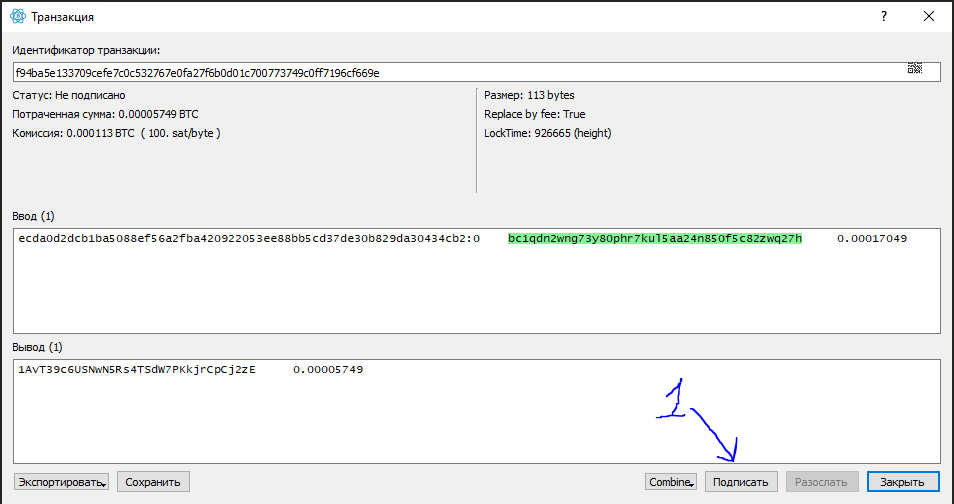
Нажимаем «Экспортировать» → «Копировать в буфер обмена».
!!! Внимание !!! Нажимаем «Закрыть».
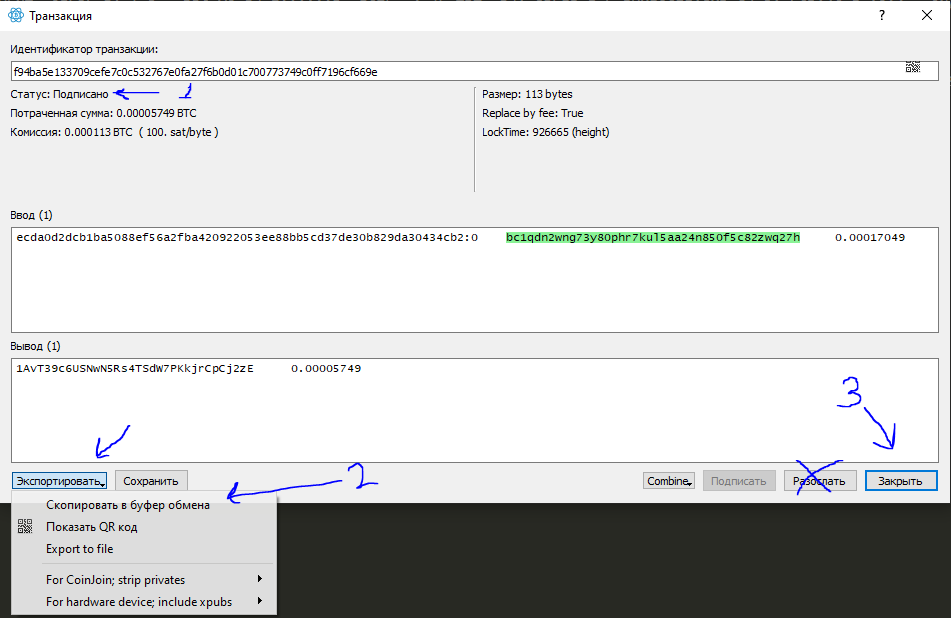
В буфере обмена будет подписанная транзакция. Что-то типа этой, но может быть длиннее:

4
Отправка транзакции
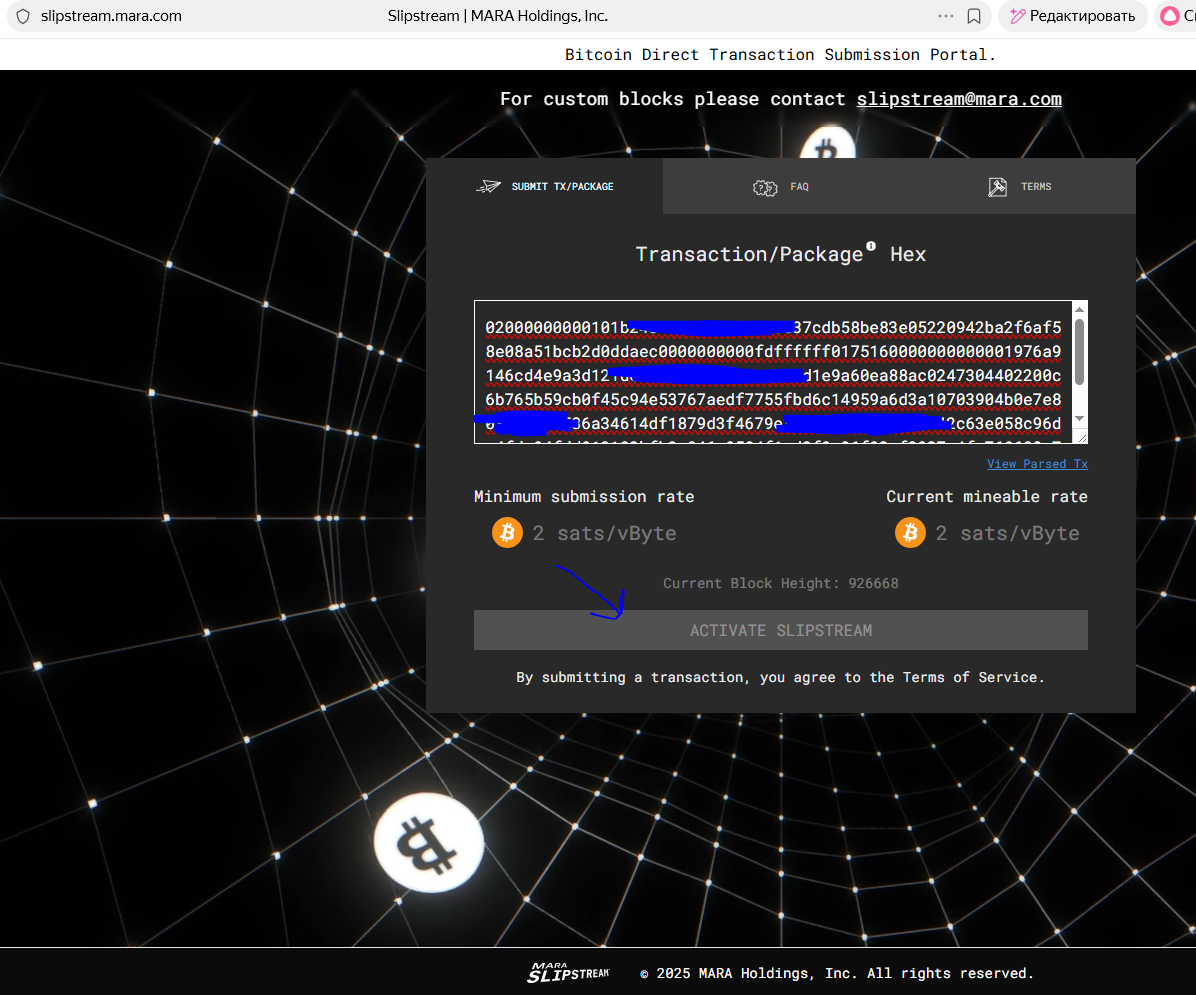
Переходим на https://slipstream.mara.com/.
Вставляем полученную транзакцию.
Нажимаем «ACTIVATE SLIPSTREAM».
И ждём, пока Mara добудет блок и наша транзакция подтвердится.
5